How to Use OXVA VPrime Pod Kit (Lock, Unlock and Setup Guide)


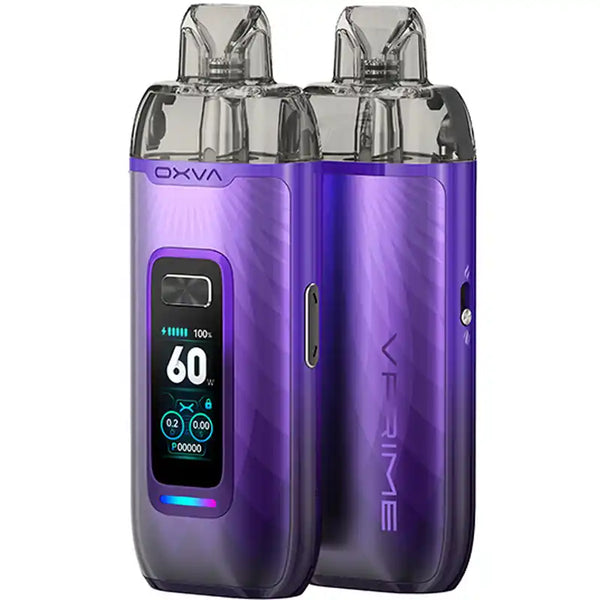
The OXVA VPrime is one of the most capable pod kits in the OXVA range, sitting alongside the Xlim Pro 2 DNA as a device aimed at vapers who want real performance and control in a compact form. With a 2600mAh battery, up to 60W output, Smart VW mode, and a vivid 3D colour display, there is more to get to grips with here than a standard pod kit. This guide covers everything you need to know about day-to-day operation, from first setup through to locking, unlocking, and resetting the device.
- What Is in the Box?
- How to Turn On and Off the OXVA VPrime
- How to Set Up the OXVA VPrime for the First Time
- How to Vape on the OXVA VPrime
- How to Adjust Wattage on the OXVA VPrime
- How to Lock and Unlock the OXVA VPrime
- How to Reset the Puff Counter on the OXVA VPrime
- How to Charge the OXVA VPrime Pod Kit
- Shop the OXVA VPrime Pod Kit at Vaping 101
- Quick Comparison
- Frequently Asked Questions
What Is in the Box?
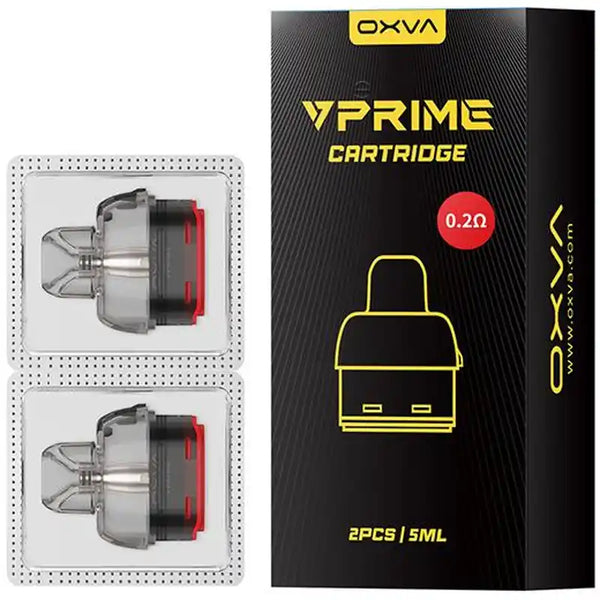
The VPrime kit comes with the device itself, a 0.2ohm pod for direct lung vaping and a 0.6ohm pod for RDL and MTL use, a USB-C charging cable, and documentation. Having two pods included means you can try both draw styles straight away without buying anything extra. Additional VPrime replacement pods are available in 0.4ohm and 0.8ohm for those who want more options across the resistance range.

How to Turn On and Off the OXVA VPrime
Turning the VPrime on and off uses the standard five-click method. Press the fire button five times in quick succession within two seconds and the display will activate, confirming the device is on. Repeat the same five clicks to turn it off. The display will power down and the device will not fire until turned back on.
How to Set Up the OXVA VPrime for the First Time
Setup guideGetting started with the OXVA VPrime pod kit is straightforward. Here is what to do before your first vape:
Charge the battery first. Connect the USB-C cable to the port at the base of the device and charge fully before use. The VPrime supports 2A fast charging, so a full charge from flat is relatively quick given the 2600mAh capacity.
Choose your starting pod. For MTL vaping, start with the 0.6ohm pod. For a more open DL draw, start with the 0.2ohm pod.
Fill the pod before inserting it. Open the fill port on the pod and fill slowly with your preferred e-liquid. Close the fill port firmly before proceeding.
Prime the coil. Leave the filled pod to sit for five minutes before inserting it into the device. This allows the mesh coil to fully saturate and prevents a harsh first draw.
Insert the pod. Slide the pod into the device. It is magnetically secured and will click into place.
Turn the device on with five rapid clicks of the fire button.
Check the wattage on the display and adjust if needed before vaping.

How to Vape on the OXVA VPrime
The VPrime supports two firing methods. It is draw-activated, so inhaling through the mouthpiece will fire the device automatically without pressing any buttons. Alternatively, you can press and hold the fire button while inhaling for manual activation. Both methods work the same way and produce the same result. Most vapers settle on one or the other depending on personal preference.
The device will cut off automatically after eight seconds of continuous firing as a safety measure. If this happens mid-draw, release and refire rather than holding continuously.

How to Adjust Wattage on the OXVA VPrime
The OXVA VPrime pod kit uses Smart VW mode, which automatically detects the resistance of the installed pod and sets an optimal wattage for it. This means you do not need to manually set the power when you first install a pod. The device handles it for you.
That said, you can override the automatic setting and adjust wattage manually using the up and down buttons on the side of the device.
The current wattage is displayed on the 3D colour screen at all times. The VPrime operates between 5W and 60W, though the practical range for most vapers will sit well below 60W depending on pod resistance. The 0.6ohm and 0.8ohm pods used for MTL and RDL vaping perform best at lower wattages, while the 0.2ohm pod is designed for higher-powered DL use.
You can also adjust the airflow slider on the side of the device independently of wattage. Sliding towards a tighter setting produces a more restricted, cigarette-like draw, while a more open position suits RDL and DL vaping.

How to Lock and Unlock the OXVA VPrime
Locking the VPrime disables the fire button and prevents accidental activation, which is useful when carrying the device in a pocket or bag.
To lock the device, press the plus and minus wattage buttons simultaneously and hold for 1.5 seconds. The display will show a lock indicator confirming the device is locked. The auto-draw function remains active when the device is locked, meaning you can still vape by inhaling, but the fire button will not respond to presses.
To unlock, press the plus and minus buttons simultaneously again and hold for 1.5 seconds. The lock indicator will disappear and the fire button will return to normal operation.
This is different to the lock method used on other OXVA devices like the Xlim Pro series, which use a four-click fire button sequence. On the VPrime, the lock is always the plus-and-minus hold.

How to Reset the Puff Counter on the OXVA VPrime
The OXVA VPrime pod kit tracks your puff count on the display. To reset the counter, press the fire button twice quickly to open the secondary menu, then navigate to the puff option and select reset. The counter will return to zero and begin tracking from that point. This is worth doing each time you install a fresh pod, as it gives you an accurate per-pod puff count rather than a running total across multiple pods.

How to Charge the OXVA VPrime Pod Kit
Charging is via the USB-C port at the base of the device. Connect to a mains adapter or laptop and the display will show battery level increasing during the charge. The 2600mAh battery is the largest in the OXVA pod kit range, so expect longer charge times than smaller devices. With regular daily use at moderate wattages, most vapers find the VPrime lasts two or more days before needing a charge. Do not leave the device charging unattended overnight.
Shop the OXVA VPrime Pod Kit at Vaping 101
The OXVA VPrime pod kit is available at Vaping 101 in eight designs across four colours and four leather finishes, alongside the full range of VPrime replacement pods in 0.2ohm through to 0.8ohm. Browse the complete OXVA collection for the full range.
OXVA VPrime Replacement Pods
Quick Comparison
| Product / feature | What it is | Best for | Format | Device detail | Shop |
|---|---|---|---|---|---|
| OXVA VPrime Pod Kit | High-performance pod kit | DL, RDL and MTL vaping | Device kit | 2600mAh battery / up to 60W | VPrime kit |
| OXVA VPrime Pods | Replacement pod range | Changing resistance and draw style | Refillable pods | 0.2ohm to 0.8ohm | VPrime pods |
| OXVA Xlim Pro 2 DNA | DNA-powered compact pod kit | Vapers comparing OXVA performance devices | Device kit | DNA chipset | Xlim Pro 2 DNA |
| OXVA | Full OXVA collection | Browsing OXVA kits and pods | Kits and pods | OXVA range | OXVA |
Frequently Asked Questions
Press the fire button five times in quick succession within two seconds. The display will activate and confirm the device is on. Repeat the same five clicks to turn it off.
Charge the battery, choose your starting pod, fill the pod, let the coil prime for five minutes, insert the pod, turn the device on with five clicks, then check the wattage on the display before vaping.
The OXVA VPrime pod kit uses Smart VW mode to automatically detect pod resistance and set an optimal wattage. You can also adjust wattage manually using the up and down buttons on the side of the device.
Press the plus and minus wattage buttons simultaneously and hold for 1.5 seconds. The display will show a lock indicator. Repeat the same button hold to unlock the device.
The OXVA VPrime pod kit is available at Vaping 101, alongside the full range of VPrime replacement pods and the complete OXVA collection.