How to Use OXVA Xlim Pro 2 DNA (Wattage, Lock, Reset and Setup Guide)


The OXVA Xlim Pro 2 DNA is one of the most technically capable pod kits available in the UK right now. Powered by the EVOLV DNA chipset, it offers wattage precision, Replay Mode, anti dry-burn protection, and real-time temperature control in a compact form factor. It is also more involved to operate than a standard pod kit, so if you have just picked one up and want to understand how everything works on the device itself, this guide covers it all from first setup through to resetting and clearing puffs.
- What Comes in the Box
- How to Turn On and Off the OXVA Xlim Pro 2 DNA
- How to Set Up the Xlim Pro 2 DNA for the First Time
- How to Change Wattage on the OXVA Xlim Pro 2 DNA
- How to Lock and Unlock the OXVA Xlim Pro 2 DNA
- How to Clear Puff Count on the OXVA Xlim Pro 2 DNA
- How to Reset the OXVA Xlim Pro 2 DNA
- How to Open and Fill the Xlim SS Pod
- Shop the OXVA Xlim Pro 2 DNA at Vaping 101
- Quick Comparison
- Frequently Asked Questions
What Comes in the Box
The Xlim Pro 2 DNA kit includes the device, two Xlim SS pods (0.6ohm and 0.8ohm), a USB-C charging cable, and user documentation. Note that the OXVA Xlim Pro 2 DNA is only compatible with Xlim SS stainless steel pods, which are specifically designed to work with the DNA chipset's temperature control and anti dry-burn features. Standard Xlim pods will fit physically but will not activate the full DNA functionality.

How to Turn On and Off the OXVA Xlim Pro 2 DNA
Turning the device on and off uses the standard multi-click method found across most regulated pod kits and mods.
- To turn on: press the fire button five times rapidly. The screen will light up and the device is ready to use.
- To turn off: press the fire button five times rapidly again. The display will switch off and the device will no longer fire.
Five clicks is the universal standard for this device and cannot be changed. If the screen is unresponsive, check that the battery has sufficient charge before assuming a fault.

How to Set Up the Xlim Pro 2 DNA for the First Time
Before vaping, there are a few steps worth taking to get the device running correctly:
- Charge the battery first. Connect the USB-C cable to the port at the base of the device and charge fully before first use. The 1300mAh battery supports 2A fast charging, so a full charge is relatively quick.
- Fill the pod before inserting it. Remove the rubber plug from the side-fill port on the Xlim SS pod, fill slowly with your e-liquid of choice, and reseal the port firmly. Do not insert a dry pod into a powered device.
- Prime the coil. After filling, leave the pod to sit for five minutes before vaping. This allows the stainless steel coil to fully saturate and prevents a dry or harsh first draw.
- Insert the pod. Slide the filled pod into the top of the device until it clicks magnetically into place.
- Turn the device on using five rapid clicks of the fire button.
- Set your wattage before taking your first puff.
How to Change Wattage on the OXVA Xlim Pro 2 DNA
Device controlsWattage adjustment is one of the most used functions on this device, and it is straightforward once you know how it works.
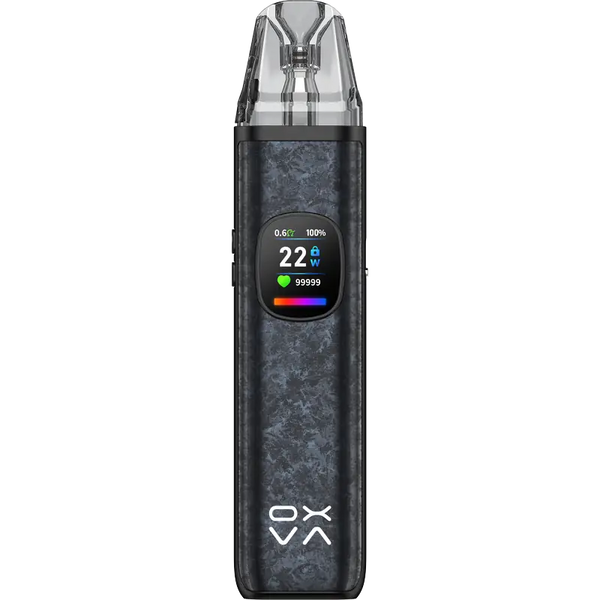
The OXVA Xlim Pro 2 DNA operates between 5W and 30W. To adjust wattage, use the up and down buttons on the side of the device while the screen is active. Each press moves the output by 1W. The current wattage is displayed on the 0.56" colour screen at all times.
As a starting guide, the 0.6ohm SS pod performs best between 15W and 25W for an RDL draw, while the 0.8ohm SS pod suits a tighter MTL draw between 10W and 20W. These are starting points rather than fixed rules. The DNA chipset adjusts power delivery in real time, so the experience at a given wattage will feel more refined than on a standard chipset device running the same number.
If you are using Replay Mode, the device will lock in the puff profile from a draw you mark as your ideal and replicate it automatically going forward, removing the need to manually fine-tune wattage for each session.

How to Lock and Unlock the OXVA Xlim Pro 2 DNA
Locking the device prevents accidental firing and wattage changes, which is useful when carrying the OXVA Xlim Pro 2 DNA in a pocket or bag.
- To lock: press the fire button three times rapidly. The screen will display a lock indicator confirming the device is locked.
- To unlock: press the fire button three times rapidly again. The lock indicator will disappear and the device returns to normal operation.
When locked, the device will not fire and the wattage buttons are disabled. The screen will still display current settings.

How to Clear Puff Count on the OXVA Xlim Pro 2 DNA
The OXVA Xlim Pro 2 DNA pod kit tracks your puff count on the display, which updates with each draw. To clear the puff counter back to zero, press the up and down wattage buttons simultaneously and hold for two to three seconds. The counter will reset to zero and begin tracking from that point again. This is useful when swapping pods, as it gives you an accurate puff count per pod rather than a running total across multiple pods.

How to Reset the OXVA Xlim Pro 2 DNA
A full device reset is handled through OXVA's Escribe software rather than through button combinations on the device itself. This involves connecting the Xlim Pro 2 DNA to a PC via the USB-C cable and using Escribe to restore factory default settings.
If you are experiencing an issue and want to try a soft reset without Escribe, turning the device off and back on again via five clicks will refresh the display and clear minor glitches in some cases. For persistent issues, Escribe is the correct route.

How to Open and Fill the Xlim SS Pod
The Xlim SS pods use a side-fill design. Here is how to refill them while in use:
- Remove the pod from the device by pulling upward.
- Locate the fill port on the side of the pod and pull out the rubber plug.
- Insert your e-liquid nozzle at a slight angle to reduce air bubble formation.
- Fill to just below the maximum fill line. Do not overfill.
- Reseal the fill port by pressing the rubber plug firmly back into place.
- Wait three to five minutes before reinserting the pod and vaping.
Both freebase and nic salt e-liquids are compatible with the Xlim SS pods. For the 0.8ohm pod used at lower wattages, a 50/50 or high-PG nic salt will suit the tighter MTL draw well.

Shop the OXVA Xlim Pro 2 DNA at Vaping 101
The OXVA Xlim Pro 2 DNA and Xlim SS replacement pods are both available at Vaping 101, where all OXVA products are sourced directly from the brand. Browse the full OXVA collection for the complete range of devices and pods.
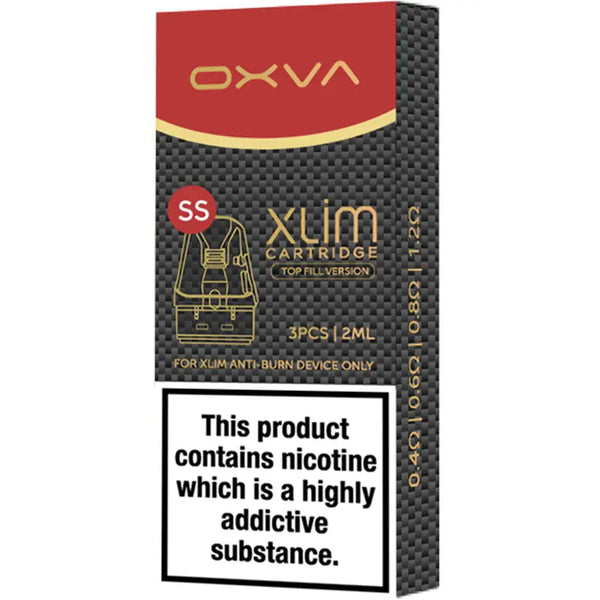
OXVA Xlim SS Replacement Pods
Quick Comparison
| Product / feature | What it is | Best for | Format | Device detail | Shop |
|---|---|---|---|---|---|
| OXVA Xlim Pro 2 DNA | DNA-powered pod kit | Replay Mode, wattage precision and anti dry-burn | Device kit | 1300mAh battery / 5W to 30W | Xlim Pro 2 DNA |
| Xlim SS Pods | Stainless steel DNA-compatible pods | Full DNA chipset functionality | Refillable pods | 0.6ohm and 0.8ohm | Xlim SS pods |
| Nic salts | Compatible e-liquid | Lower wattage MTL vaping | 10ml e-liquid | Best with 0.8ohm pod | Nic salts |
| OXVA | Full OXVA collection | Browsing OXVA devices and pods | Kits and pods | OXVA range | OXVA |
Frequently Asked Questions
Press the fire button five times rapidly to turn on the OXVA Xlim Pro 2 DNA. Press the fire button five times rapidly again to turn it off.
Use the up and down buttons on the side of the device while the screen is active. The OXVA Xlim Pro 2 DNA operates between 5W and 30W, with each press moving the output by 1W.
Press the fire button three times rapidly to lock the device. Press the fire button three times rapidly again to unlock it. When locked, the device will not fire and the wattage buttons are disabled.
Press the up and down wattage buttons simultaneously and hold for two to three seconds. The puff counter will reset to zero and begin tracking from that point again.
The OXVA Xlim Pro 2 DNA is only compatible with Xlim SS stainless steel pods for full DNA chipset functionality. Standard Xlim pods may fit physically but will not activate the full DNA features.