How to Use Geekvape Aegis Legend 5 (Settings, Reset and Firmware Guide)


The Geekvape Aegis Legend 5 is a serious piece of kit. Powered by the AS 4.0 chipset, built to IP68 tri-proof standards, and capable of up to 200W across five output modes, it has more functionality than most vapers ever fully explore. This guide covers everything from locking and unlocking the device through to navigating the settings menu, changing the RGB lighting, clearing the puff counter, resetting the mod, and understanding what the firmware situation actually is.
- What You Need Before You Start
- How to Turn On and Off the Aegis Legend 5
- How to Lock and Unlock the Aegis Legend 5
- How to Navigate the Settings Menu
- How to Change Modes on the Aegis Legend 5
- How to Change the Colour and RGB Lighting
- How to Clear the Puff Counter
- How to Change the Coil on the Aegis Legend 5
- How to Factory Reset the Aegis Legend 5
- How to Check and Update Firmware on the Aegis Legend 5
- Shop the Geekvape Aegis Legend 5 at Vaping 101
- Quick Comparison

What You Need Before You Start
The Aegis Legend 5 is a standalone box mod, which means it does not come with batteries included. It requires two external 18650 batteries, sold separately. Before using the device for the first time, fit two fully charged high-drain 18650 cells, attach your preferred sub-ohm tank, and ensure you have a USB-C cable to hand for charging when needed. The Geekvape Aegis Legend 5 kit is also available if you want the mod paired with the Zeus Sub-Ohm Tank and Z Series coils included.
How to Turn On and Off the Aegis Legend 5
Turning the device on and off uses five rapid clicks of the fire button within two seconds. The 1.08 inch TFT colour display will light up on power on, showing the power-on animation before entering standby mode. The same five clicks powers the device off completely. The default mode when the device powers on is Smart Mode.
How to Lock and Unlock the Aegis Legend 5
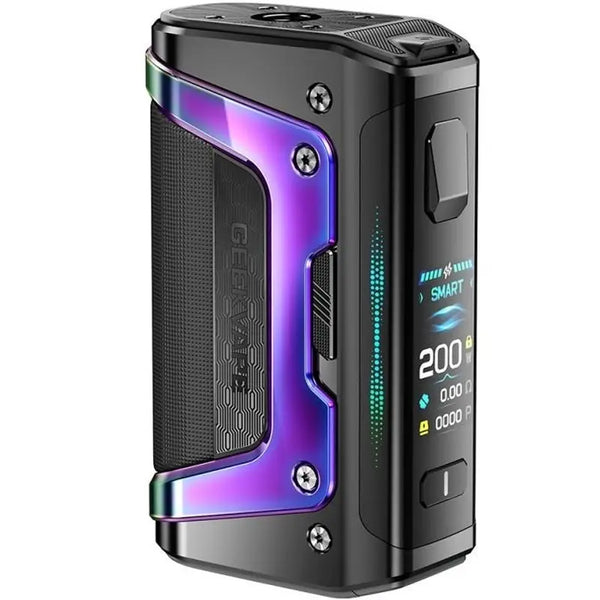
Device controlsThe Aegis Legend 5 uses Geekvape's A-Lock system, which is a physical slide switch located on the side of the device rather than a button combination. Sliding the switch down locks the device completely, preventing the fire button and adjustment buttons from responding. Sliding it back up unlocks the device and returns it to normal operation. The physical lock is one of the most reliable locking mechanisms across the Aegis range because it cannot be accidentally triggered through button presses in a pocket. If the device produces a vibration alert when you attempt to fire, check whether the A-Lock switch is engaged before assuming a fault.
The A-Lock prevents physical button activation, but the screen lock is a separate function. To lock and unlock the screen only, press the plus and minus buttons simultaneously. This is useful if you want to prevent accidental setting changes without fully locking the device.
How to Navigate the Settings Menu
Pressing the fire button three times within two seconds enters the settings menu. From there, use the plus and minus buttons to move the cursor between options and press the fire button to select or confirm. The menu gives you access to mode selection, RGB lighting, puff counter, Auto wattage, battery balance, version information, and factory reset. Press and hold the fire button to exit the menu at any point.
How to Change Modes on the Aegis Legend 5
The Geekvape Aegis Legend 5 has five output modes, each suited to a different vaping style or preference.
Smart Mode is the default and the most straightforward option. The AS 4.0 chipset reads the resistance of the installed coil and automatically sets an optimal wattage range. You can adjust within that range using the plus and minus buttons, but the device prevents you from exceeding safe limits for the coil. This is the best starting point for most vapers.
Normal Mode operates at a standard output for the installed coil, giving you a fixed power state without the automatic adjustment of Smart Mode.
Eco Mode reduces output to conserve battery life, useful for extending your session when you are running low on charge.
Custom Mode allows you to set a variable power curve across five points, giving experienced vapers precise control over how power is delivered throughout a puff.
TC Mode activates temperature control for compatible coil materials including stainless steel, nickel, and titanium.
To change modes, press the fire button three times to enter the settings menu. The cursor will rest on the working mode option by default. Press plus or minus to scroll through Eco, Normal, Smart, Custom, and TC. Hold the fire button for approximately one second to confirm your selection.
How to Change the Colour and RGB Lighting
The Geekvape Aegis Legend 5 features multicoloured side LED lighting that can be adjusted or turned off entirely through the settings menu. Press the fire button three times to enter the menu, use plus or minus to navigate to the light option, and press the fire button to enter it. From there, select your preferred RGB effect from six options: Comet, Fusion, Luna, Nebula, Nova, or Off. Press the fire button to confirm your selection.
To change the display colour on the main screen, navigate to the mode selection screen and press the plus and minus buttons simultaneously for one second. This cycles through the available display colour options without entering the full settings menu.

How to Clear the Puff Counter
The Aegis Legend 5 tracks your cumulative puff count on the display. To reset it, press the fire button three times to enter the settings menu, then press the fire button again to move the cursor to the PU (puff) display. Press plus or minus to clear the current value. This is worth doing when you install a new coil so you can track usage per coil accurately.
How to Change the Coil on the Aegis Legend 5
Coil changes on the Geekvape Aegis Legend 5 are handled through the Zeus sub-ohm tank rather than the mod itself. Here is how to do it:
- Remove the tank from the 510 connection on the mod.
- Unscrew the base of the tank by twisting it anticlockwise.
- Pull the old coil straight out. Use a paper towel if the coil is sticky with e-liquid.
- Prime the new coil by applying a few drops of e-liquid directly into the cotton wicking holes on the side of the coil head. This saturates the cotton before first use.
- Push the new coil firmly into the base until it is seated correctly.
- Reassemble the tank and reattach it to the mod.
- Wait five to ten minutes before firing to allow the coil to fully prime with e-liquid from the tank.
The Aegis Legend 5 is compatible with the full Geekvape Z Series coil range, including the Z0.15 and Z0.4 mesh coils included in the kit.
How to Factory Reset the Aegis Legend 5
If the device is behaving unexpectedly or you want to restore default settings, a factory reset can be performed through the settings menu. Press the fire button three times to enter the menu, navigate to the Reset option using the plus and minus buttons, and press the fire button to confirm. This restores the device to its original factory configuration, clearing any custom wattage or mode settings you have saved.
For a soft reset without clearing settings, turn the device off using five clicks of the fire button and remove the batteries briefly before reinserting and powering back on. This clears any temporary glitches without affecting saved configurations.
How to Check and Update Firmware on the Aegis Legend 5
To check the current firmware version, turn the device off using five rapid clicks of the fire button. With the device powered off, press and hold the plus and minus buttons simultaneously. The screen will display the current firmware version installed on the device.
On the question of updating: Geekvape officially advises that firmware updates are no longer recommended for their products. As of September 2021, Geekvape ceased providing firmware updates and explicitly states that devices which stop functioning after a firmware update are not covered under warranty. If you are experiencing an issue, a factory reset or soft reset is the recommended first step rather than attempting to update firmware. Firmware version information is useful primarily for verifying authenticity or troubleshooting with Geekvape support.
Shop the Geekvape Aegis Legend 5 at Vaping 101
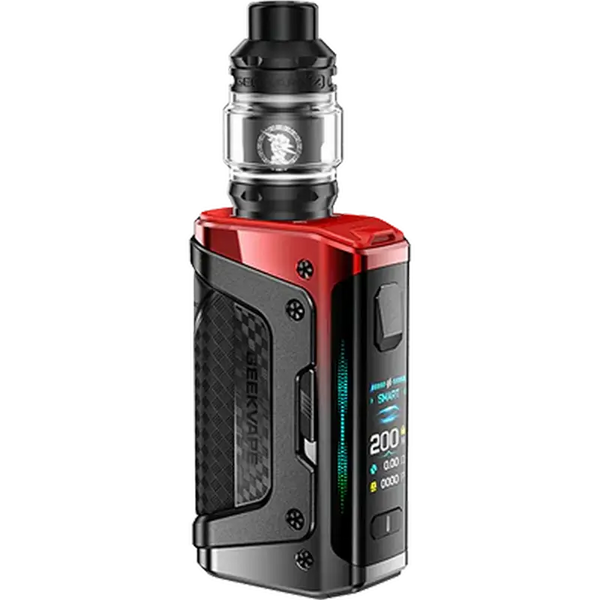
The Geekvape Aegis Legend 5 mod and the Aegis Legend 5 kit with Zeus tank are both available at Vaping 101. Browse the complete Geekvape collection for coils, tanks, and accessories across the full range.
Geekvape Aegis Legend 5 Vape Kit
Quick Comparison
| Product / feature | What it is | Best for | Format | Device detail | Shop |
|---|---|---|---|---|---|
| Geekvape Aegis Legend 5 Mod | Standalone dual-battery box mod | High-power vaping and full device control | Mod only | Up to 200W / dual 18650 batteries | Aegis Legend 5 |
| Aegis Legend 5 Kit | Mod and Zeus tank kit | Ready-to-use sub-ohm setup | Kit | Zeus tank and Z Series coils | Aegis Legend 5 kit |
| Zeus Sub-Ohm Tank | Compatible sub-ohm tank | Coil changes and high-VG vaping | Tank | Z Series coils | Zeus tank |
| Geekvape | Full Geekvape collection | Browsing coils, tanks and accessories | Devices and accessories | Geekvape range | Geekvape |